Sound Effects Delay or Lag Behind Clicks in
Terminal Client Software
Sensible Cinema Box Office and Concession
for Windows
VERSION COMPATIBILITY:
Microsoft Windows Vista
(all flavors of Vista)
SYMPTOM:
The clicks and other
sound effects in the terminal program are noticeably lagging behind the
associated click events.
REASON:
Microsoft has changed
the audio stack adding several ‘enhancements’ that add effects for systems with
surround sound for home theatre. Regardless of what the computer’s purpose is
to be, this feature is turned on in Vista by default. Disabling it will allow the
program to behave instantaneously as it does in Windows 2000 and XP.
SOLUTION:
Disable audio
enhancements in the Windows Control Panel by following the steps below.
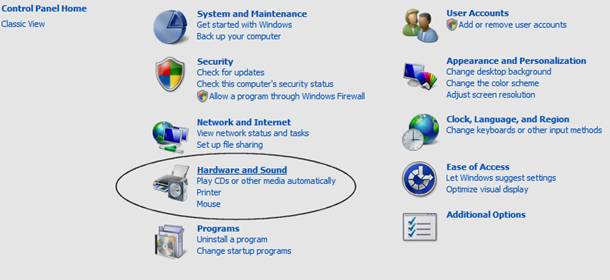
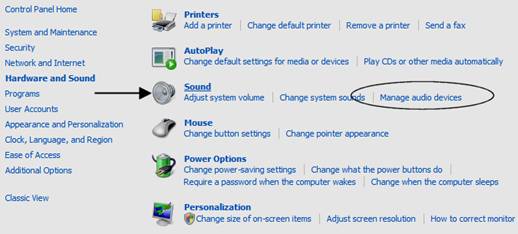
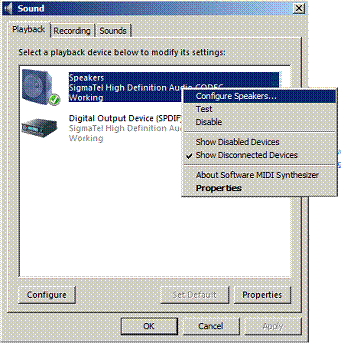
Right-click for speaker properties
menu or press ‘Configure’ button.
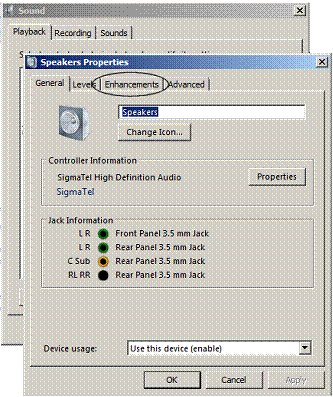
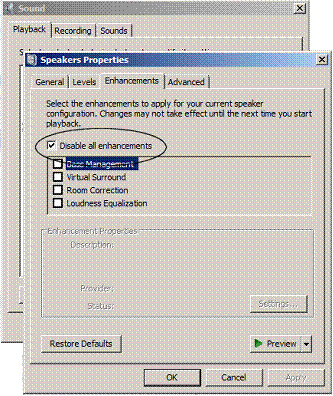
Select the ‘Enhancements’ tab.
Check the ‘Disable all enhancements’
check box.
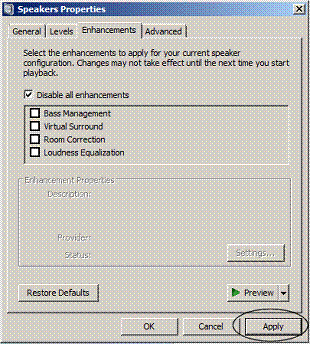
Press ‘Apply’ and ‘OK’ to save the
changes and close the dialog box. Close the Control panel.
This document was created and added on June 10, 2007.